Case Master Pro
  • Home
  • Software Features
    • Case Management
    • Billing & Accounting
    • CMP Imaging
    • Administration
    • Security
    • Reporting
    • Document Management
    • Software Integration
  • Add-ons
    • Email Automation
    • Integrated Payments
    • Client Dashboard
    • Payment Dashboard
    • Outside Counsel Login
    • EDI Interfaces
    • Direct Check Module
    • Data Conversion
  • Resources
    • Help Documentation
    • Help Videos
    • Support
    • Debt Collection Blog
    • Solutions and Pricing
    • Software Enhancements
  • About Us
    • About Case Master Pro
    • Testimonials
    • Contact Us
  • Free Demo
Select Page

General Case Management

40
  • Abbreviations
  • Adding a Legal Status
  • Adding an Opponent / Debtor
  • Adding and Using Review Codes
  • Adding Hold Codes
  • Adding Multiple Images to an Activity Note
  • Adding New Activity Codes
  • Adding Wage and Bank Garnishments
  • Additional Opponent / Debtor Screens
  • Case File Basics
  • Checking for Conflict Files and Problems
  • Counties, Clerks, and Court Locations
  • Creating a New Case File
  • Creating a New Client (Part 1 of 2)
  • Creating a New Client (Part 2 of 2)
  • Creating and Assigning Reviews to a User Group
  • Daily Dashboard
  • Data Mining: Propensity to Pay
  • Data Mining: Suggest Next Action
  • Editing Bad Phone Numbers and Addresses
  • Favorites Feature
  • Field Change History (Audit Log)
  • File Status Codes
  • File Tags
  • Financial Calculator
  • General Navigation Menus and Buttons
  • Image Sharing
  • Imaging (Paperless Office)
  • Importing New Files
  • Litigation Screens
  • Misapplied Debtor Payments
  • Opponent Declares Bankruptcy Procedure
  • Opposing Attorneys
  • Payment Arrangements
  • Renumbering or Deleting a Case File
  • Returned Mail Feature
  • Status Bar
  • Understanding Settings Hierarchy
  • User Preferences
  • Workflows

Security

4
  • External Users
  • Resetting Passwords
  • Security Features
  • Two-Factor Authentication

Add-Ons

3
  • Adding an Enhanced Email Signature
  • Enhanced Email Automation
  • Microsoft Outlook Add-On

Document Management

11
  • Adding a Signature
  • Advanced Document Generation
  • Basic Document Generation
  • Batch Documents
  • Building Document Expressions
  • Creating Spreadsheet Templates
  • Document Fragments
  • Document Generation Selection Options
  • Document Letterheads
  • Document User Prompts (Ask Fields)
  • Merging PDF Templates

Accounting

23
  • Accounting Reports
  • Adding Costs and Expenses to Retain
  • Adding Wage and Bank Garnishments
  • Adjusting Commercial Rates and Suit Fees
  • Balance Calculation Basics
  • Changing Print Scale When Printing Checks in CMPOnline
  • Contingency Rates and Buckets
  • Entering a Balance Adjustment
  • Entering and Printing Checks
  • Entering Client Invoice Payments and Unpaying Bills
  • Entering Deposits
  • Financial Calculator
  • Generating a Client Remittance Report
  • How to Set Up and Enter Hourly Billing
  • Misapplied Debtor Payments
  • Post Direct Payment to Client
  • Preparing and Finalizing Bills
  • Searching for Checks
  • Transactions Check Register
  • Transferring Funds
  • Trust Account Reconciliation Procedure
  • Unfinalizing, Editing, and Reprinting Bills
  • Void Checks

Preferences

4
  • Adding Top Buttons to Grids
  • Enabling Pop-Ups
  • Resetting Passwords
  • User Preferences

Administration

16
  • Abbreviations
  • Adding a Legal Status
  • Adding and Using Review Codes
  • Adding New Activity Codes
  • Assigning Attorney Bar Numbers
  • Automations
  • Batch Internal Status Updates
  • Company Settings: Company Tab
  • Customizing Case Types
  • Image Restore
  • Reassigning Reviews, System Users, and Default Users
  • Renumbering or Deleting a Case File
  • Resetting Passwords
  • Status Bar
  • Terminology
  • User Defined Fields

Tools

7
  • Adding a Legal Status
  • Custom Reporting
  • Data Mining: Propensity to Pay
  • Data Mining: Suggest Next Action
  • Importing Batch Images
  • Importing New Files
  • Reassign or Copy Custom Reports

CMPOnline Support

1
  • SOS Support Line Access Instructions
View Categories

Data Mining: Propensity to Pay

AI Doc Summarizer Doc Summary
AI Doc Summarizer Thinking Thinking
Open PDF file

Overview

This help document provides an overview of the Data Mining feature Propensity to Pay. As it is already included in CMPOnline, it is available now to help the user understand the likelihood of a debtor to pay based on several factors.

Navigation: Where to find Propensity to Pay

Since this feature is included as a standard feature to all CMPOnline users, you already have access. 

  • Once on a Case File, Navigate to Case File > Main.
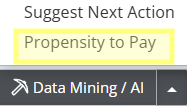
  • Locate the Data Mining / AI button at the bottom right of the screen.
  • Click the arrow beside the button to expand the AI menu.
  • From the menu, select Propensity to Pay.
What is Propensity to Pay?

  • The Propensity to Pay tool provides a quick, data-driven score indicating how likely a debtor is to settle their debt based on objective data points.
  • After navigating to and selecting Propensity to Pay, a window will appear displaying a Score. 
  • The calculation analyzes current case data: account balance, age of debt, available debtor demographics,  and estimates the likelihood of payment.
  • This likelihood is displayed as a Confidence indicator: Low, Medium, High. 
  • Also displayed are the top data elements that went into the determination of the score in the Pros/Cons sections of the window. 
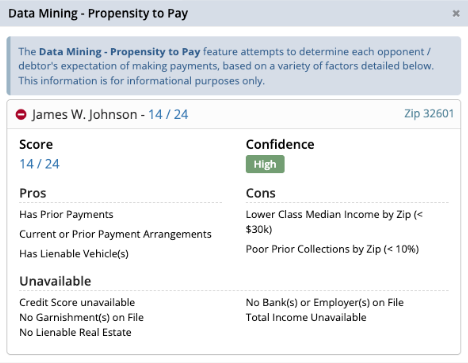
Propensity to Pay Details

Questions?

https://casemasterpro.com/software-support/

support@casemasterpro.com | (386) 675-0177

Additional Features, General Navigation, Tools

Share This Help Document:

  • Facebook
  • X
  • LinkedIn
Table of Contents
  • Overview
  • Navigation: Where to find Propensity to Pay
  • What is Propensity to Pay?
  • Questions?

CMPOnline by Case Master Pro
P.O. Box 252
Georgetown, FL 32139
phone: (386) 675-0177

Contact Us

  • Facebook
  • LinkedIn
  • YouTube
  • Twitter
  • RSS

Software Features

  • Case Management
  • Billing & Accounting
  • CMP Imaging
  • Administration
  • Reporting
  • Document Management
  • Software Integration

Add-on Features

  • Email Automation
  • Payment Processor Integration
  • Client Dashboard
  • Payment Dashboard
  • Outside Counsel Login
  • EDI Interfaces
  • Direct Check Module
  • Data Conversion

Discover the Features Every Law Firm Needs

  • About Our Legal Case Management Software Company
  • Case Management Software
  • Debt Collection Software with Custom Reporting
  • Legal Billing Software
  • Legal Software Administration
Copyright © 2005-2026 Case Master, Inc. All rights reserved.