
 Doc Summary


Overview
This help document provides an overview of how to utilize the information provided by the Data Mining Suggest Next Action tool and how that information is derived from CMPOnline.
Navigation: Where to find Suggest Next Action
Since this feature is included as a standard feature to all CMPOnline users, you already have access.
- Navigate to Case File > Main.
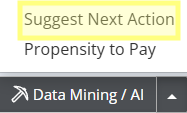
- Locate the Data Mining / AI button at the bottom right of the screen.
- Click the arrow beside the button to expand the AI menu.
- Select Suggest Next Action.
What is Suggest Next Action?
This tool analyzes your case and the history of similar case files to predict the next logical step in your workflow. At this stage, these suggestions are provided for informational guidance only to assist in your decision-making process.
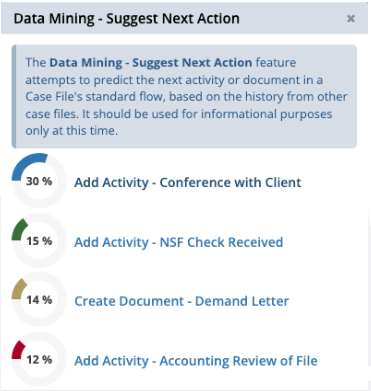
When you click Suggest Next Action, it may suggest:
- Having a Conference with Client
- Adding an Activity of NSF Check Received
- Creating a document to send, for example, a Demand Letter
- Adding an Activity of performing an Accounting Review of File
- And so much more!
Questions?
https://casemasterpro.com/software-support/
support@casemasterpro.com | (386) 675-0177


