
Featured Enhancements
Added the ability to mark a “text” User Defined Field (UDF) with a “{{URL}}” formatting option, which will add an “(open)” link to the right of the UDF label to open the text / URL in a new browser window, under Administration > Setup > User Defined Fields.
Updated many of the grids in CMP so that users can search for currency values with or without the “comma” in the currency display text.
We’ve integrated with PaymentVision! Enjoy another great option for credit card and ACH payments.
Click here to see how it streamlines your workflow.
My Reviews
- Added the “Client Reference” field (from the Case File > Main screen) as an optional column to the My Reviews grid.
Case File
- Opponents/Debtors > Debtors (Garnishments):
- Provided a Reactivate Garnishment button (must be enabled by a CMP administrator) to the Garnishment popup screen to change a “Dismissed” garnishment back to “Active”, in situations when the debtor returns to work for the same employer and the original garnishment remains enforceable under the original issued date.
- Litigation > Settlement Offers:
- Created a “Settlement Offers” area for tracking settlement offers.
- Financial > Balance:
- Added a company setting (must be enabled by a CMP administrator) to automatically use the correct starting Judgment Rate on Florida Variable Rate Judgments when the Judgment Rate is not populated on the Litigation screen (instead of reverting to quarterly variable rates).
- Financial > Billing:
- Supplied an “Hourly Case” information message at the top of the billing screen on Case Files marked as hourly, to include the attorney and current user’s hourly rate.
Contacts
- Outside Counsels:
- Included a “Fee Split” option as a Remit Type for Outside Counsels for firms who accept debtor payments, but need to split contingency fees with a 3rd party.
Tools
- Batch Documents:
- Improved error messaging when adding documents to the Batch Documents area from a Custom Report if the report contains a required field that is marked as non-visible.
- Custom Reporting:
- “Expenses To Retain”, “Contingency Rate (File or Client, with Suit Fees)” and “Contingency Rate (File or Client, with Suit Fees and O/C Fees)” added as fields to the “CaseFile” fieldset.
- Data Import > Transactions:
- Users now have the ability to include a “Remit Date” column as part of the Transactions import (applicable to “Debtor Payment” transactions).
Accounting
- Bank Account Recon > Tools:
- Provided the ability for users to correct previously printed Check dates.
- Billing > Open Bills:
- Additional error reporting introduced to the “Finalize Bills” logic to better document possible issues with missing PDF versions of bills saved to CMP for later reference.
Administration
- Lookups
- Accounting > Account Types:
- Added hover-over messaging (and additional details) to the Referral Interest Label on the Account Type setup screen.
- Document > Document Packages:
- Enhanced coding to allow for Document Validity Check “conditions” to include Document Expression fields (which were previously unavailable).
- Accounting > Account Types:
- Security > Security Groups:
- Increased the maximum length of a “Security Group” name from 20 to 100 characters, and added a notes field to these lookups.
- Security > Form Security:
- Created the ability for users to set “Form Security” on the CMP “Dashboard” screen (specifically for the Billing View and Payments View tabs).
- Setup > Company > Accounting tab:
- Added a company setting to allow users to post deposits to case files in the “Closed Pending (CLOP)” status.
- Setup > Document Templates:
- Updated the Document Fragment popup to use a “Detail” view (instead of icon view) when selecting a document fragment to insert into a document template.
General
- CMP Dashboard:
- Created a “Costs View” tab / chart with drilldowns to the Dashboard view.
- Updated the “Did you know? “ tooltips on the Login Screen.
- Added the “Default Date / Date of Loss” (found on the Case File > Accounts screen) to the CMPFind tool as a searchable field.
- Logic expanded to set the “Branch” (Internal Status) field if it has been configured with a default value at the Company-level or Client-level when new case files are saved to CMP and the branch is blank (such as for new files imported via Excel).
- “Judge Name” and “Judge Name (Reverse)” included as searchable fields to the CMPFind tool.
- Integration successful with the ClearACH API for automated ACH payment processing.
Did You Know?
CMPOnline has all kinds of hidden secrets!
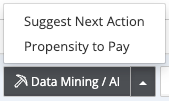 CMPOnline’s Data Mining tools can help save your team time and increase efficiency. The Suggested Next Action feature keeps case files moving by predicting the next logical step in your standard workflow, helping users stay on track and maintain productivity. When paired with the Propensity to Pay feature, users gain a quick snapshot of the likelihood that a debtor will make a payment based on key case data, enabling more informed decision-making and prioritization of collection efforts. To access these included Data Mining tools, navigate to Case File > Main Screen. In the bottom-right corner of the screen, click Data Mining/AI to open the available features.
As always, if you have questions, CMP Support is happy to help!
Stay tuned for future tips about CMPOnline!