
Featured Enhancements
Included a new “Remit Summary (Excel)” option to the available reports that can be displayed after a remittance runs, which presents remit totals by client, under Accounting > Remittance.
Added new hover-over on document templates to display which Document Packages they belong to, under Administration > Setup > Document Templates.
My Reviews
- New “Judge Name” optional field added in the My Reviews grid.
Case File
- Main:
- Updated the grid length options to 100 / All within the Payments quick view (on the Main screen) and added a scrollbar to this grid.
- Added logic to the “Copy Settings From” client option (when adding a new client during the new case creation process) to better replicate the copied client’s settings and converted the dropdown to a “select2” style.
- Opponents / Debtors > Garnishments:
- New “Showing All” / “Showing This File” option on the Bank and Employer lookup within the Simple Garnishment screen, to easily filter the list down to just banks / employers for that opponent / debtor.
- Litigation:
- Added the ability to add an unlimited number of User-Defined Fields at the “Litigation” level; set up under Administration > Setup > User Defined Field Labels.
- Activity:
- Included the ability to “PIN” an activity note or legal status to the top of the Activity grid when the PIN column is activated in the visibility settings.
- Documents:
- Enhanced logic to drastically speed up the load time of document packages into the “folder” view on the Documents screen (thus speeding up screen load time), especially for firms with a large number of documents.
- Added a company setting (must be configured by a CMP administrator) so that firms can default the Dev Express Ribbon Bar to “visible” (firm wide) when generating a document.
- Imaging:
- New scroll bar added to the “dropzone” area of various Image Upload popups, for users who upload a large number of images at once.
- Financial:
- Transactions:
- Increased the number of characters allowed in a Transaction’s “Reference” field from 75 to 150.
- Added a warning message when deleting a Transaction that has unbilled / billed / paid entries tied to it.
- Costs / Checks:
- Included the “Opponent Name” as an optional column to the Checks / Costs grids.
- Changed the ordering of the Checks / Costs wording and tab layout to “Costs / Checks” when the ability to add Costs (such as those paid via credit card) at the case file level are enabled (must be enabled by a CMP administrator).
- Added a background color change when adding a Cost vs. adding a Check to help users tell the difference between the two.
- Included a company setting (must be configured by a CMP administrator) that will have the “Costs” tab listed first (before “Checks”), if enabled.
- Enhanced logic to use the “Default Amount” setup on a transaction type / code when entering a Check / Cost, if the payee’s rates are either unspecified or the case file doesn’t have an amount calculated via the payee’s rate structure.
- Transactions:
Contacts
- Clients > Settings > Checking:
- Added the ability to set a “Preferred Check Type” on the client level that appears as an optional column when selecting checks to print.
Tools
- Batch Documents:
- Included the ability to “Download ZIP” file of individual documents created / built during a Batch Documents run in either their “Native” format or “PDF” format.
- Data Import > Excel Placements:
- Updated logic in the Excel Placements import to allow the “Case File Client Reference” field (if mapped) to act as the “Account 1 Account Number” field (if not mapped), thus removing the limitation that requires the “Account 1 Account Number” to be mapped in order to import properly.
Accounting
- Billing > Open Bills:
- Included a Company Setting (must be enabled by a CMP administrator, only valid for users of the Enhanced Email Automation) for BCC-ing the “sending user” on bills / invoices sent from the Open Bills screen.
- Checks > Print Checks:
- Enhanced logic to show the “File Reference” (to include case number, file number, account number) on Checks, even when a combined check report generates, if that check is made up of only 1 Case File.
Administration
- Lookups:
- Document > Document Packages:
- New “Auto Finalize?” checkbox added to Checks added by Document Packages (once verified or generated) so that the check entry is auto-finalized, for firms with the “Costs” features enabled (must be enabled by a CMP administrator).
- Financial > Interest Methods:
- Redesigned the Interest Method detail and rates screens to make it easier to edit these rate structures and make the screens more aligned with typical grid layouts.
- Document > Document Packages:
- Setup:
- Company:
- Advanced tab:
- Included a company setting to display a popup message when loading a case file if the SOL Date (or Judgment Expiration Date) has passed.
- Enhanced Email tab:
- Added a company setting (must be configured by a CMP administrator) so that firms can change the default font style and font size that is used as part of the Enhanced Email Automation.
- Updated the Enhanced Email Automation toolbar to include the option to change the font style / size.
- Automations tab:
- Added an Automation Action of “Add Batch Document” to the Automation popup dialog.
- New ability to trigger “Add Transaction” Company Automations based on the current Case File Balance.
- Included the ability to add a Check (or finalized check / cost, if enabled by a CMP administrator) via the Company Automations.
- Advanced tab:
- Document Templates:
- Included “Copy Format” and “Paste Format” buttons in the Document Templates editor.
- New company setting (must be configured by a CMP administrator) that allows firms to change the default font style and font size that is used when creating new document templates.
- Document merge fields additions:
- “AllGuarantorsNames”
- “AllNonGuarantorsNames”
- “AllOpponentsCompanyNames”
- Company:
General
- Daily Dashboard:
- Added drilldowns / shortcuts to the detail that makes up the Daily Dashboard’s “Unremitted Payments”, “Unbilled Costs”, and “Outstanding Bills”, if these options are visible.
- Included Cases By Branch / Internal Status pie chart on the Daily Dashboard’s Case Overview tab.
- Enhanced “Review” WebAPI controller for firms to automate adding reviews to a case file through external programming.
- New “Open Files View” screen (similar to My Reviews) where users can view / filter on high-level case file information based on the Default User assigned to the case (must be enabled by a CMP administrator).
- Preferences:
- Added a User Preference setting for showing a popup message when loading Case Files with potential case file “Conflicts” in CMP.
Did You Know?
CMPOnline has all kinds of hidden secrets!
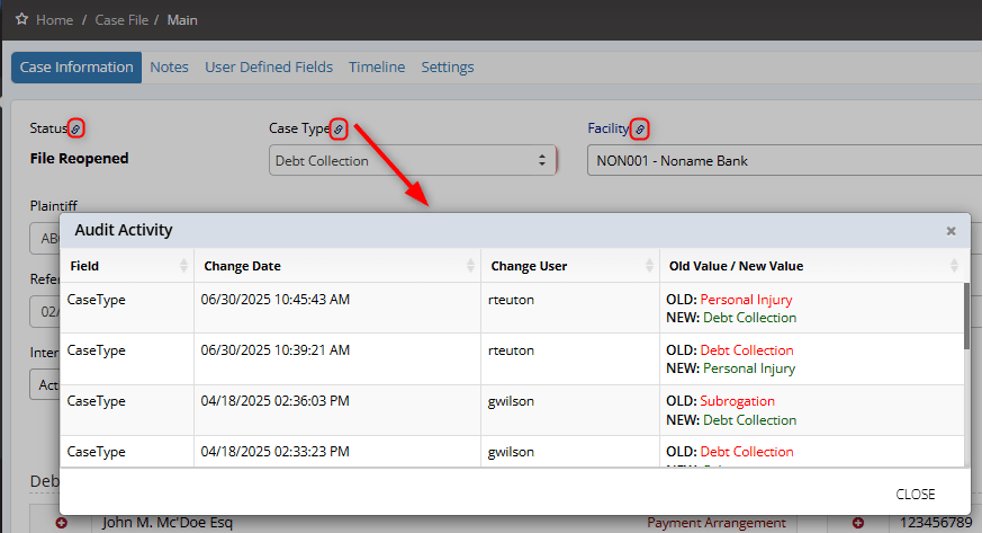
Ever wondered who updated a specific date or changed a status on a case? You don’t have to play detective—CMPOnline keeps a detailed history for you.
Simply click the linkicon located next to a field heading to open the Audit Activity Grid. This gives you an instant “deep dive” into that specific field, showing exactly who changed the data, the previous value, and the precise timestamp.
Stay tuned for future tips about CMPOnline!