
Featured Enhancements
Added the ability to configure a “Field Comparison” Filter in Custom Reporting (where 2 CMP fields can be compared, such as comparing a Transaction Date to the Judgment Date), under Tools > Custom Reporting.
Additional “drilldown” option within the “Payments View” tab of the Daily Dashboard screen (which is viewable by clicking on the CMPOnline logo in the top left corner), so that users can drilldown into the Payment Form Breakdown by clicking the appropriate dollar amount in addition to clicking in the pie chart.
Interested in taking credit card and ACH payments? Contact us for more information.
Case File
- Main:
- New ability to run a “Quick Conflict Check” when creating a new case file.
- Accounts:
- Added audit tracking to the Account Description field.
- Increased the field size for the “Loss Description” field on the Accounts screen from 1,000 to unlimited characters.
- Opponents / Debtors:
- New quick toggle option to view the Opponent / Debtor’s Physical Address on the “Contact Card” tab moving it from the “Other Addresses” tab.
- Added the ability to copy Payment Arrangement details configured in the “Calculator” to the Opponent / Debtor’s Payment Arrangement via a “copy to arrangement” link, under the Case File > Opponents / Debtors > Financials tab.
- Removed the requirement of filling in a “Monthly Net” amount when adding new Opponent Income records, under the Case File > Opponents / Debtors > Financials tab.
- Documents:
- Added coding to allow users to enable signing order and configure multiple signers for a document sent via DocuSign.
- Reviews:
- Ability to “Enable Multi Select” on the Reviews screen to delete multiple reviews at once.
Tools > Custom Reporting
- Added a “First Payment Post Judgment” custom reporting fieldset with associated fields, to report on the first payment made after a judgment was awarded.
- New logic and fields to track a Custom Report’s creation date/user and last modified date/user. These fields can be optionally displayed on the Custom Reporting grid and can be enabled using the “eyeball” visibility button.
- Added unique Custom Reporting fields for User Defined Fields that are overridden by the Account Type, to include the appropriate Account Type in the custom reporting label.
Accounting > Deposits > Import
- Added logic to the Deposit Import to allow a user to optionally supply the Client Reference number in lieu of the CMP File Number or Case Number to load entries to the correct file.
Administration
- Lookups:
- Added a “Show Account Description” checkbox to the Account Type setup, so that the “Account Description” field on the Accounts screen can be toggled on / off based on the Account Type, under Administration > Lookups > Account > Account Types.
- Enhanced setting on Contingency Rate Buckets to “Ignore Costs” for situations where Costs are not subject to contingency rates and are handled via Costs to Remit or Expenses to Retain, under Administration > Lookups > Financial > Contingency Rate Buckets.
- Reporting:
- Added “Deleted Reviews” to the User Breakdown Chart, under Administration > Reporting > User Activity.
- Setup:
- Company:
- Ability to change the “SNI – No Pmt Arrangement, see note” review that CMP adds to a case file when a payment is made without a payment arrangement in place, under the Administration > Setup > Company > Accounting tab.
- Users can now use “Add Opponent Garnishment” as a “Triggering Action” for running Company Automations, under the Administration > Setup > Company > Automations tab.
- Added a company setting to optionally hide the “blue information box” on the Case File > Main screen, configured under the Administration > Setup > Company > Advanced tab.
- Document Templates:
- New Merge Fields:
- Bank, Wage, and Tax “*GarnTotalAmount”, “*GarnPaymentAmount”, and “*GarnExpiryDate” document merge fields.
- “OpponentRelationship” and “OpponentXRelationship” (to display the Opponent’s relationship to the primary party on the case).
- “BankGarnBankCounty”
“BankGarnBankBranchCounty” - “Opponent4*”
- New Merge Fields:
- System Maintenance:
- Added the ability to reassign the Responsible Attorney on case files.
- Company:
General
- Updated the CMPFind tool to include the Opponent’s SSN/EIN in search results within the Global Search, and to recognize SSNs in both formatted (with dashes) and unformatted (without dashes) formats.
- Increased a Contact’s “Company Name” field length from 100 to 150 characters, and increased the Address fields, across many areas in CMP from 50 to 100 characters.
- Added a “Select Current Page” dropdown option to some of the “Select All” buttons that appear at the bottom of some CMP grids.
- New “AccountSOLDate” and “AccountSOLDateWithColor” as fields that can be used in the default email subject line template, status bar template, and case type header template.
- Added a “recommended settings” option on the Preferences screen to auto-select CMP’s recommended user settings, under User Preferences.
Did You Know?
CMPOnline has all kinds of hidden secrets!
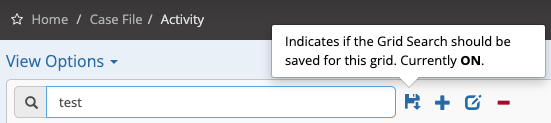
CMPOnline includes several helpful shortcuts designed to make your workday more efficient. One of these is the Save Grid Search feature. This is especially useful when you are working multiple case files and need to consistently filter for a specific item in the Activity grid, or when searching for a particular transaction in the Transactions grid. Simply enter your search criteria and click the Save icon. As you navigate through the program and work various files, your filter will remain in place, eliminating the need to repeat your search each time. When you’re finished, just uncheck the Save icon to return to the full grid view.
Note: The Save Grid Search feature resets at the end of each CMPOnline session.
Stay tuned for future tips about CMPOnline!