
Featured Enhancements
Added the Insured’s Name and SSN to the “Global” CMPFind search algorithm.
Added the ability to mark a “CC – Court Costs” transaction code as “Do NOT Bill for Costs” so a bill is never generated to the client for that particular cost when it is finalized, under Administration > Lookups > Financial > Trans Types / Codes.
Interested in taking credit card and ACH payments? Contact us for more information.
Case File
- Main (must be enabled by a CMP administrator):
- Added “TokenGuard” functionality to the PaymentVision front-end in CMP.
- Added a Company Setting to auto-disable the PaymentVision convenience fee for ACH transactions.
- Personal Injury (if set up in CMP as a custom case type):
- Added a “Lien Requested Date” to the Personal Injury screen.
- Documents:
- Added a User Preferences option to “Expand Selected Contacts on Documents Screen?”, which will always expand the “Selected Contacts” options on the Case File > Documents screen, under User Preferences.
- Imaging:
- Added a “spinner” icon when doing text searches of Images, to alert the user that the system is thinking.
- Added the “Image Note” as an optional field to the Exhibits popup grid.
Tools
- Custom Reporting:
- New “Court Location” fieldset, with appropriate fields.
- New “Personal Injury” fieldset, with all of the fields from the “Important Dates” area (if set up in CMP as a custom case type).
- Added “Non Service” and “Non Service Reason” fields to the “Opponent” / “Debtor” fieldset.
- Added the “Review ID” field, internal, unique ID number of the review to the “Review” fieldset.
Accounting
- Added a company setting to permit the user to include Clients with different remittance styles when running remittances, under Accounting > Remittance (must be enabled by a CMP administrator).
Administration
- Added the “Opponent Name” as an optional column to the “Detail” grid within the User Activity reporting, under Administration > Reporting > User Activity.
- Added the ability to Reassign Reviews based on a custom report (must include the “Review ID” field), under Administration > Setup > System Maintenance.
- Setup > Company > Automations Tab:
- Added a “PIP SOL Date” field as an available triggering field in Company Automations.
- Added the ability to set a Limiting Factor within Company Automations based on the Account Total’s minimum and maximum values. To populate these fields, expand the Limiting Factor(s) section.
Did You Know?
CMPOnline has all kinds of hidden secrets!
Trust account issues? We’ve got a new way to make troubleshooting easier.
CMP now includes a Trust Account Worksheet that lets you download an Excel spreadsheet with all trust account transactions for the selected case file — making it simple to track discrepancies and review activity in one place.
Here’s how to access it:
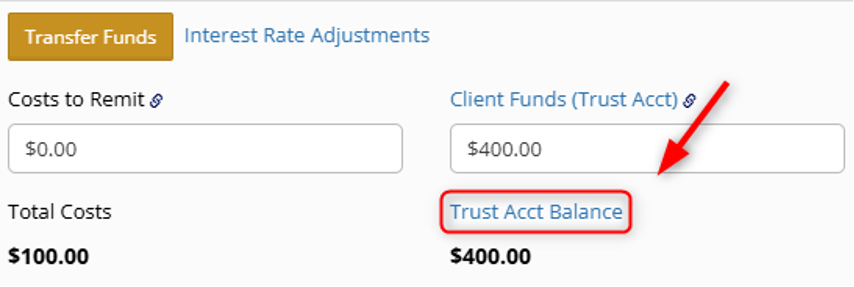
Go to Case File > Financial > Transactions and click on “Trust Acct Balance.”
Your spreadsheet will download instantly and be ready for review.
⚠️ Quick tip: Make sure your pop-up blocker is disabled, or the spreadsheet won’t download.
As always, if you have questions, CMP Support is happy to help!
Stay tuned for future tips about CMPOnline!