
Featured Enhancements
Included the “File Tags” field as an optional column on the My Reviews screen.
Added the ability to move case files to a new Client Code based on the file numbers listed in a custom report, under Administration > Setup > System Maintenance.
My Reviews
- Added an “AI Action Opportunities” view to the My Reviews screen to identify high collectability to balance files (with good recovery opportunities) where a significant action could be taken.
Case File
- Main:
- Settings tab:
- Added the “Interest Stop Date” to the Case File Audit Log tracking.
- Take Payment button (if enabled for your firm and your processor is PaymentVision):
- Adjusted the “Recurring Payment Processing” procedure to auto-cancel recurring payment plans where the recurring end date has passed or the case file is closed.
- Updated the batch jobs so that they are archived for 60 days (instead of 30 days).
- Added logic to the daily import to check for ACH Returns and void / handle these properly in CMP, reporting all results to the accounting user.
- Settings tab:
- Guardianship (if the Guardianship screen is enabled via the Case Type setup):
- Included the various Guardianship screen’s contacts’ information in the Phonebook popup.
- Litigation:
- Additional Judgments tab:
- Included the ability to “Link Judgments” for case files with multiple judgments, where a payment entered towards any judgment on the case file will also be applied to all other eligible judgments on the file.
- Added a “calc” option on the Additional Judgments’ Interest field (must be enabled by a CMP administrator) for calculating interest from the pre-judgment Balance Start Date to the Date of the Additional Judgment.
- Additional Judgments tab:
- Documents:
- Revised logic in the Excel spreadsheet merge process so that currency / decimal merge field values take on the cell formatting that is used in the spreadsheet (instead of always defaulting to text).
- Enhanced logic in the Excel spreadsheet merge process so that Excel calculations auto-process when the spreadsheet is built.
- Financial > Balance:
- Added a hover-over to the Per Diem field on the Balance screen for multi-count or multi-judgment cases to show a breakdown of that amount per account / judgment.
- Included information popups when hovering over some titles in the “Header Detail” on the Balance screen.
Contacts
- Increased the “Department” field length from 50 to 100 characters within a Contact’s sub-contacts.
- Clients > Settings > Review Code Access tab:
- Included the ability to limit which Review Codes can / cannot be added to a Case File based on the Client setup.
Tools
- Custom Reporting:
- Included “Image Link” custom reporting fields in the “Images” and “Last Image” fieldsets, allowing a user to pull up an image directly from within custom reporting results.
- “Opponents” fieldset field additions:
- Employer Email Address
- Physical Street Address
- Physical Street Address 2
- Physical City
- Physical State
- Physical Zipcode
- “Opponent / Debtor Garnishments” fieldset field additions:
- Garnishment Employer County Code
- Garnishment Bank County Code
- Data Import > Imaging Holds:
- Added the ability to have barcodes read from documents (to assign file number and image description) when uploaded through the Imaging Holds area.
Accounting
- Deposits:
- Enter Deposits:
- Added a warning message when entering deposit entries with Effective Dates more than 90 days old.
- Recurring Payments:
- Included the Case File’s Status Code to the Recurring Payments grid.
- Enter Deposits:
- Billing > Open Bills:
- Added the Branch field to the Open Billing grid as an optional field.
Note: The Branch field could be labeled differently based on your firm’s terminology.
- Added the Branch field to the Open Billing grid as an optional field.
Administration
- Lookups > Case File > Activity Codes:
- Added Contact Attempt Type dropdown (and options) to the Activity Code setup, to better identify types of contact attempts based on activity codes entered.
- Reporting > AI Intelligence (Portfolio):
- Added an AI Intelligence – Portfolio overview report to Administrative reporting (must be enabled by a CMP administrator), based on AI Collectability scores by client.
- Security > Menu Security and Form Security:
- New scrollbars added to the windows within the Menu Security and Form Security setup areas for easier navigation.
- Setup > Company:
- Accounting tab:
- Added the ability to customize the Billing Email Subject Line (when the Enhanced Email Automation is enabled) for outgoing bills emailed through CMP.
- Advanced tab:
- Added an “Open File Message” company setting that can be configured to alert the user with a message when opening new case files.
- Automations tab:
- Enhanced ability to set a Limiting Factor within Company Automations based on the Venue County.
- Updated the ability to set a Limiting Factor within Company Automations based on the Branch, so that multiple branches can be selected for a single automation.
- New logic to the Company Automations triggered by Adding a Review to optionally use the Review’s Date Due as the “default date” (meaning that it will be used instead of the current date for automation actions).
- Added an Automation Action of “Clear Payment Arrangement” to the Automation popup dialog.
- Added an Automation Action of “Close the File” to the Automation popup dialog.
- Accounting tab:
- Setup > Document Templates:
- New document merge fields:
- BankAddressBlock
- EmployerAddressBlock
- SelectedBankEmployer_Address
- SelectedJudgment_PerDiemInterest
- New document merge fields:
- Setup > System Maintenance:
- Added the ability to rebuild Payment Arrangement reviews on the currently loaded Case File.
- Setup > User Defined Field Labels:
- Added Case File-level UDF Text or Date fields as fields that can be used in the default email subject line template, status bar template, and case type header template.
General
- Added logic to speed up load times for AI Call Scripts and added a warning message regarding the Mini-Miranda to the top of the AI Call Scripting results.
- Added AI Call Scripting to script phone calls to debtors (must be enabled by a CMP administrator).
- Updated the “* Global Name / Address / Account Search *” in the CMPFind so that it only reports a file once, based on best “Match Type”, under the CMPFind tool.
- Updated various DLLs in CMP to the latest version to increase speed / alleviate security concerns.
- Added a “Master Zipcode” table from the US Postal Service to include all valid zipcodes across all states, to aid in (and supplement) city / state zipcode lookups in CMP.
Did You Know?
CMPOnline has all kinds of hidden secrets!
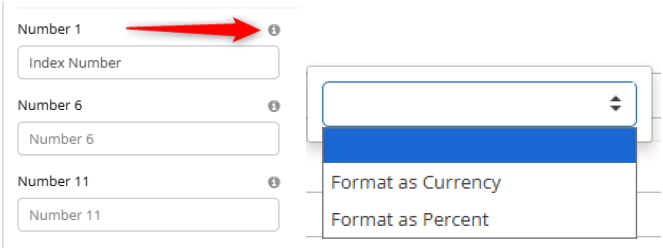
While CMPOnline provides a robust set of standard fields, every business has unique data points that require specific tracking. User Defined Fields (UDFs) offer the flexibility to capture that niche information. By utilizing the new Formatting Options for eligible field types, you ensure data integrity across your team—turning raw input into meaningful, standardized information like currency, percentages, or dates. This not only makes your reports more professional but also ensures your data remains accurate and consistent.
To view or update the format of your custom fields, navigate to Administration > Setup > UDF Labels and click on fields that have the “” icon available to view and select the appropriate formatting options.
As always, if you have questions, CMP Support is happy to help!
Stay tuned for future tips about CMPOnline!